Electronic Filing
From the Home Screen use: User Setup > User Settings > Electronic Filing
From the Menu use: Setup > User Settings > Electronic Filing
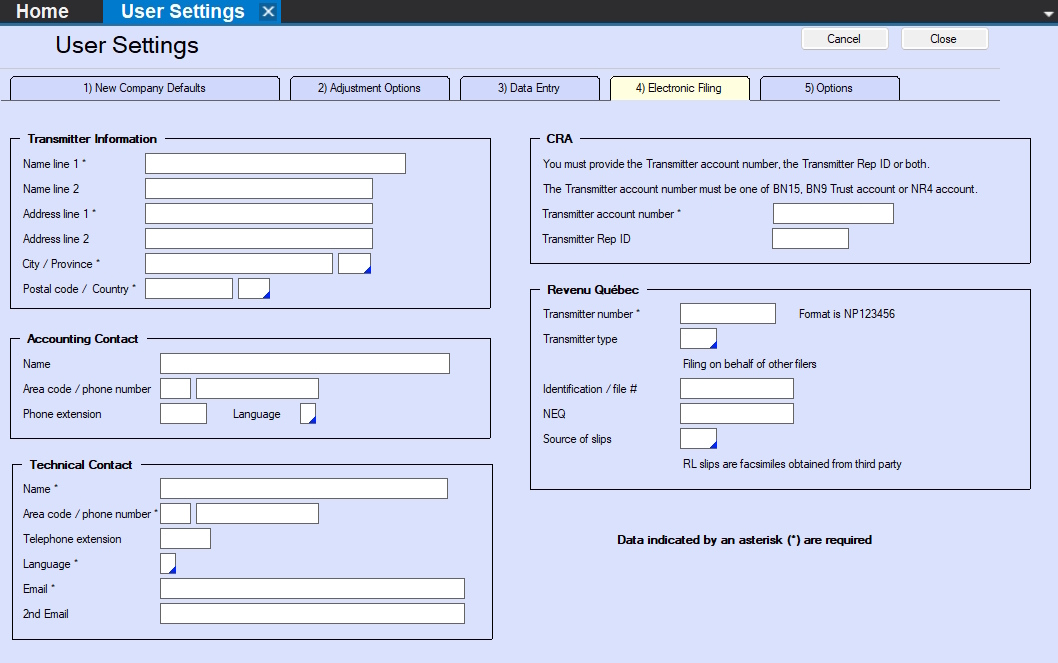
User Settings - Electronic Filing
NOTE: Items marked with an astersik are required.
Transmitter Information section - This section contains the contact information of the Transmitter of the XML submission, NOT the company to which this data belongs.
Accounting Contact section - This section contains the contact information for the accounting contact for the data being submitted; CRA or Revenu Québed may contact this individual if the XML file has accounting issues..
Technical Contact section - This section contains the contact information for the technical contact for the data being submitted; CRA or Revenu Québed may contact this individual if the XML file has technical issues.
CRA section - This section contains the transmitter account information for the Transmitter of the XML submission, NOT the company to which this data belongs.
- The Transmitter Account Number or Rep ID entered here MUST identical to what will be used to access the CRA filing portal.
- Enter EITHER the Transmitter Account Number OR the Rep ID OR BOTH.
- The Transmitter Account Number can be one of:
- 15 character Business Number
- 9 character Business Number
- Trust Account Number
- NR4 Account Number
Revenu Québec section - This section contains the transmitter account information for the Transmitter of the XML submission, NOT the company to which this data belongs.
- Transmitter Number - Enter the 8 character number assigned to the Transmitter by Revenu Québec
- Transmitter Type - Select the appropriate Transmitter type from the drop-down list.
- Identification / file # - The 16 character Business Number assigned to the Transmitter by Revenu Québec.
- NEQ - The 10 digit numerical identifier assigned to the Transmitter.
- Source of slips - Select the source of slips from the drop-down list.